Question:- WHAT IS INHERITENCE IN C++?
The capability of a class to derive properties and characteristics from another class is called Inheritance. Inheritance is one of the most important features of Object-Oriented Programming.
Inheritance is a feature or a process in which, new classes are created from the existing classes. The new class created is called “derived class” or “child class” and the existing class is known as the “base class” or “parent class”. The derived class now is said to be inherited from the base class.
When we say derived class inherits the base class, it means, the derived class inherits all the properties of the base class, without changing the properties of base class and may add new features to its own. These new features in the derived class will not affect the base class. The derived class is the specialized class for the base class.
- Sub Class: The class that inherits properties from another class is called Subclass or Derived Class.
- Super Class: The class whose properties are inherited by a subclass is called Base Class or Superclass.
The article is divided into the following subtopics:
- Why and when to use inheritance?
- Modes of Inheritance
- Types of Inheritance
Why and when to use inheritance?
Consider a group of vehicles. You need to create classes for Bus, Car, and Truck. The methods fuelAmount(), capacity(), applyBrakes() will be the same for all three classes. If we create these classes avoiding inheritance then we have to write all of these functions in each of the three classes as shown below figure:
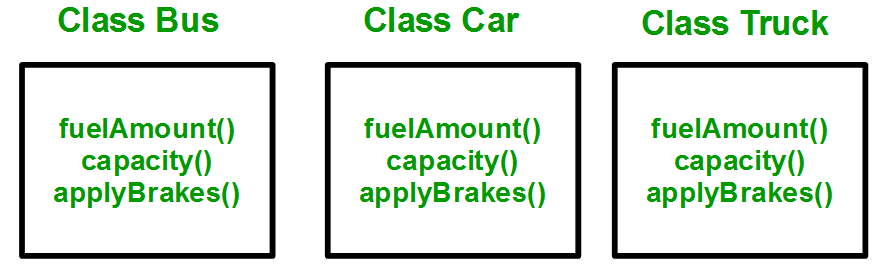
You can clearly see that the above process results in duplication of the same code 3 times. This increases the chances of error and data redundancy. To avoid this type of situation, inheritance is used. If we create a class Vehicle and write these three functions in it and inherit the rest of the classes from the vehicle class, then we can simply avoid the duplication of data and increase re-usability. Look at the below diagram in which the three classes are inherited from vehicle class:

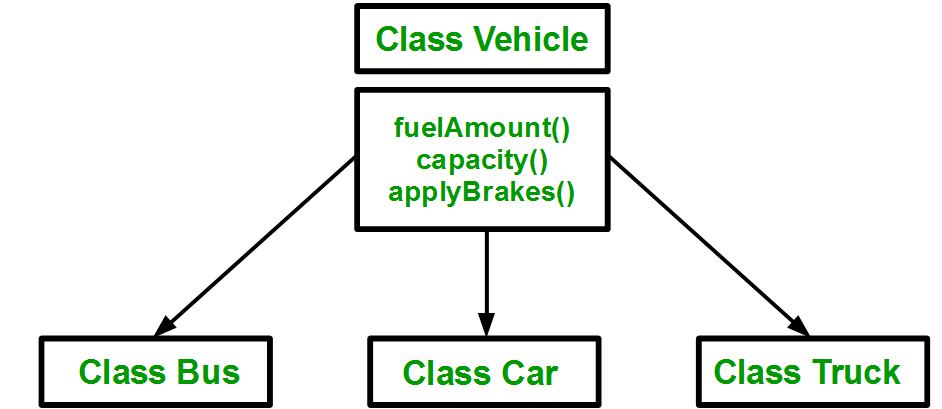
Using inheritance, we have to write the functions only one time instead of three times as we have inherited the rest of the three classes from the base class (Vehicle).
Implementing inheritance in C++: For creating a sub-class that is inherited from the base class we have to follow the below syntax.
Derived Classes: A Derived class is defined as the class derived from the base class.
Syntax:
class  <derived_class_name> : <access-specifier> <base_class_name>
{
        //body
}
Where
class — keyword to create a new class
derived_class_name — name of the new class, which will inherit the base class
access-specifier — either of private, public or protected. If neither is specified, PRIVATE is taken as default
base-class-name — name of the base class
Note: A derived class doesn’t inherit access to private data members. However, it does inherit a full parent object, which contains any private members which that class declares.
Example:
1. class ABC : private XYZ //private derivation
{ }
2. class ABC : public XYZ //public derivation
{ }
3. class ABC : protected XYZ //protected derivation
{ }
4. class ABC: XYZ //private derivation by default
{ }
Note:
o When a base class is privately inherited by the derived class, public members of the base class becomes the private members of the derived class and therefore, the public members of the base class can only be accessed by the member functions of the derived class. They are inaccessible to the objects of the derived class.
o On the other hand, when the base class is publicly inherited by the derived class, public members of the base class also become the public members of the derived class. Therefore, the public members of the base class are accessible by the objects of the derived class as well as by the member functions of the derived class.
- C++
Output:
Enter the Id: 101
Enter the Name: Dev
Enter the Course Name: GCS
Enter the Course Fee:70000

101      Dev     GCS    70000
- C++
Enter the Id:Enter the Name:Enter the Course Name:Enter the Course Fee:
0    t    0

Comments
Post a Comment